Start-up page:
CNC machining centers are the most popular
types of CNC machine tools used today. Most companies that have any CNC machines
have at least one machining center. Unfortunately, companies are finding it more
and more difficult to find and hire qualified CNC people. Many are realizing
that they must provide extensive training to new hires and provide at least some
continuing training to established employees.
But not all companies provide CNC training to
their new hires, whether they should or not. And many individuals need to take
training matters into their own hands, and do whatever it takes to learn about
CNC. But until now, books were about the only training materials an individual
could afford.
This courseware makes it possible for companies
to train CNC people from scratch. And its priced in a way that individuals can
afford. While we assume the student has some basic machining practice
experience, we assume nothing about their previous CNC skills. Using our proven
key concepts approach, we bring students up to speed gradually – constantly
building upon previously presented information – and we stress the reasons why
things are done as importantly as how they’re done. Six of the ten key
concepts are most related to programming, and four are related to setup and
operation.
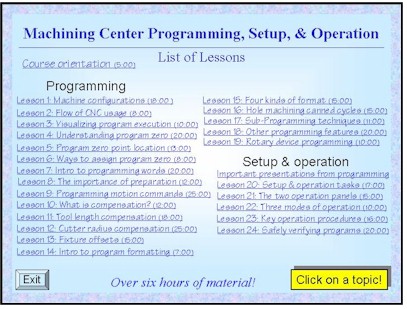
We further divide the key concepts into
twenty-four lessons. Lessons range from under five minutes to just over twenty
minutes in length (total course presentation time is six hours, five minutes on
one CD-rom).
All examples are shown in the format for the
most popular control in the industry – the Fanuc control. Note that many
control manufacturers claim to be Fanuc-compatible.
When the full course is purchased, this
courseware includes everything your people need to learn CNC machining center
programming programming, setup, and operation - and it can be used over and over
again to teach others in your company about CNC turning center usage.
Why Microsoft PowerPoint?
All presentations have been developed using
Microsoft PowerPoint for Windows 95/98, which is fast becoming the industry
standard for computer generated presentations. We use the freely distributed
PowerPoint Viewer to display all presentations. PowerPoint Viewer is included.
System requirements: You must have a multimedia
computer with Windows 95 or above and a minimum of 64 megs of internal memory to
run the courseware.
Full Course Includes:
- Presented by Mike Lynch
- Courseware on 1 CD-ROM disk
- 6 hours, 5 minutes of presentation
- 24 lessons
- Tutorial manual (329 pages)
- Workbook containing 24 exercises
- Answer book
- One year subscription to The Optional Stop
Newsletter
- Free phone assistance calling to CNC
Concepts INC.


 Click
for details
Click
for details